After my first article “Analyzing the Quality of your code with NDepend” on NDepend, I found few new interesting feature in it’s new release. Microsoft has introduced new version of the Visual Studio which my first choice for development. New Roslyn platform heading us to the Open source development using the Microsoft tools that making things easier to learn and get knowledge about the new tools. But we are going to explorer new features of the NDepend. Few of them are as below:
Support for Visual Studio 2017
- NDepend 2017.1 supports Visual Studio 2017.
- NDepend 2017.1. It also supports Visual Studio 2015, 2013, 2012 and 2010.
.NET Core support
- NDepend can now analyze any .NET Core assembly and its associated PDB and source files.
- The new .NET Core Portable PDB file format is now also supported.
- Support for inferring code to analyze from a project.json file, which about to completely come in the first quarter of this year. All .NET Core assemblies you need to analyze can be easily found through Analyze .NET assemblies in directory (recursive).
Dashboard Improvements
- Dashboards have been improved in the NDepend UI in Visual Studio, in the generated reports section and in the Team Services web portal.
- It now contains technical debt estimations, quality gates, rules and issues data.
- For each data, a visual indicator shows the progression since baseline. Red and green coloured values are used to pinpoint progress or regression.
- Clicking any value generates a query that drills down through corresponding data, which can be a list of code elements, debt estimations, quality gates, rules or issues.
![clip_image002[4]](https://blogger.googleusercontent.com/img/b/R29vZ2xl/AVvXsEhJTjiTi-wE3R6zNNYKHTl_XBaNv4cdumqFjp2Xy5dghs2WdJyNCTmp8jgK_niObt8X8e2vKscohoiI6ZokP8JH4Ins_v66NU_sEUJAsvSwRKzHwhSRl8dqGCd1Z87CiqGW2UNh5zEhMoDj/?imgmax=800 "clip_image002[4]")
Visual Studio Team Services VSTS and TFS 2017 Advanced Extension
A new Visual Studio Team Services extension is available. It consists of a build task that analyses code and code coverage yielded by the build process.
A web portal presents the results which embeds the NDepend dashboard and makes data actionable by drilling down anything with a single click.
A new Visual Studio Team Services extension is available. It consists of a build task that analyses code and code coverage yield by the build process. A web portal presents analysis results.![clip_image004[4]](https://blogger.googleusercontent.com/img/b/R29vZ2xl/AVvXsEiUDq8asxyPEhka1YUG6y4esl9g5uC2C8UzERZCDpgl76D0AmT_tCm4eWnachSZ7CgGlAXjDUVh1-apUBSxPvJhMU9ohtnNcT2nS9F6sy1z-anS_cS6oYPNGHfYQaYT-Ch6KVGLVYToMxJC/?imgmax=800 "clip_image004[4]")
- The web portal has a dashboard that presents the most relevant data including technical debt, code size, quality gates, rules and issues numbers.
- A TFS build can be used as a baseline. All dashboard data is then diff-ed since the baseline.
- Each data presented in the dashboard is clickable to view more information.
![clip_image006[4]](https://blogger.googleusercontent.com/img/b/R29vZ2xl/AVvXsEiOple-N3aph6JeYkBChR2Cz82a4iidVMOHgZz9PQm_qna-QYZozF22YVEUBBEP8GGkyqieI_fp5SYitefo1B4kUal6pJIfDpVG38VkcD2PcQFd1mK1ucjr3VMUwXLzwhBk7HRcpmTi5E4E/?imgmax=800 "clip_image006[4]")
- A detailed summary of quality gates is available.
![clip_image008[4]](https://blogger.googleusercontent.com/img/b/R29vZ2xl/AVvXsEjbgDlRxiKGg_qrx7UAylQY5Pl1LK9vRsHKhN24Q0fjGNBclfdfY-y5TGiFncGt3eUV2DqMENSZNBW2CHnjnd4qfbyvkkC0GK3RqRBRgU1TiDJZkYx_nxfhV75KfyftqthBAwJ76sq5t6Fe/?imgmax=800 "clip_image008[4]")
- Technical debt can be drilled down till the issue level. Clicking an issue allows it to be edited in the Rules panel.
The datagrid is interactive: issues can be grouped, ordered and filtered by rule name.
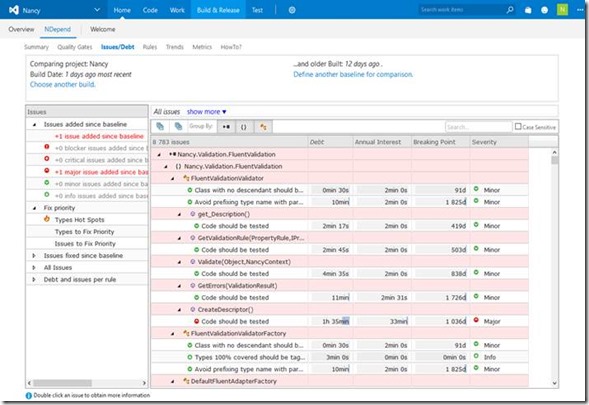
- Rules details can be explored. Clicking a rule violation redirects the user to the VSTS Code Search extension, displaying the source code of the culprit code element.

- The VSTS extension logs trend metrics for each build, and Trend charts are shown.

- A panel shows a code metrics recap for each code element. The datagrid is interactive: elements can be grouped, ordered and filtered by name.

Report Improvements
- The new improved report dashboard now contains information on debt and issues.

- The report main section contains Quality Gates status summary.

- The report Rules Summary now shows the number of issues added and fixed per rule.
![clip_image021[4]](https://blogger.googleusercontent.com/img/b/R29vZ2xl/AVvXsEhcfprURWuW-HZ0NnDp6kG0XafGHdrRSwjpPkfzdEd2WUNYa2qBxVRbMXCxGPx1HTdg3kSz-qV1Zobdca66qZ8enejMTcOXd1X1KOxkqixUJdqes5ENgTbjDMIYma7SUFI-aUoCN1LFuj5D/?imgmax=800 "clip_image021[4]")
- A green/red colour scale is now shown on code coverage values.
![clip_image022[4]](https://blogger.googleusercontent.com/img/b/R29vZ2xl/AVvXsEitfHKTQOmMk-6_hauCq27449jIYUamca7rWUPT-ueo-J0TfPHCN1tvybEkX_4yzEUbVu3XigJvjMYKHOekW0X9JasrLXcsfTdLGkvABN4V7dk1CrQos3zES2t4C8ULSl9_Oi306ChuT_E8/?imgmax=800 "clip_image022[4]")
Code Querying Improvements
- Thanks to the new queryable domains QualityGates, Issues, IssuesInBaseline, Rules queries can be written to match IQualityGate, IIssue, IRule objects according to any criteria (rule violated or not, quality gate status that went from pass to fail, issues added since baseline, issues severity or debt...).
![clip_image023[4]](https://blogger.googleusercontent.com/img/b/R29vZ2xl/AVvXsEjMeQ5DiG1ysDikU4_2hBKU_8vjr4zEXgP4pInpZhb0k8ivB_hE5hOlLIIfRqkfibVBVOxiFRClkJIIRI0ZT2dflnTrGxnYl1T_ni4SlKp-4r9qCM3IgXC_aDZdiWpT4sPZZliijFM2lNW1/?imgmax=800 "clip_image023[4]")
- New syntax to write quality gates.
- A new button lets you run the currently edited code query against the baseline.
![clip_image024[4]](https://blogger.googleusercontent.com/img/b/R29vZ2xl/AVvXsEhHbiXUAE1mSbbGO8RnAmItBNcYmAv4R-dBdJN2IUBPG4MoeEVGLONm3AY_FVaKAKmXfUpCqI3tA55VdWiKE9IwVIuQ5rshNKMdssWQdtyT34AQgNNn7vpm9sMS5KI01hyphenhyphenlruoFwR2d_nq3/?imgmax=800 "clip_image024[4]")
- A code query can now return code elements of various kinds such as assemblies, namespaces, types, methods and fields.
This new queryable domains are available including CodeElements ANTMF ; CodeElementParents ANT ; TypesAndMembers TMF ; Members MF ; CodeContainersANTM ; AttributeTargets ATMF ; where Assemblies, Namespaces, Types, Methods, Fields.
- A query can now return values of technical debt through new types Debt, AnnualInterest, DebtRating, Severity, TrendIcon and can also return System.Version and System.TimeSpan values.
![clip_image025[4]](https://blogger.googleusercontent.com/img/b/R29vZ2xl/AVvXsEhGeElONAITLMbaIJfFLj_YUIQEvrry97pS4WF-FYlaVOUcYuxv17HmaW3zCYs1w2m6TIy7R7d9Y5GnsdDPF4Sxo1lOCYLzVTeKh3DrLLH3_vbVhT9sFBg-vRYQDMQjCfBUyjlBB_0YpW96/?imgmax=800 "clip_image025[4]")
- A colour scale is now shown on query result metric values making it easier to compare them at a glance.
- You can now write very simple queries like Methods or JustMyCode.CodeElements or codebase.PercentageCoverage. This syntax simplifies writing quality gates and trend metrics queries.
- Trend metrics used to only be defined with queries that return a scalar. A trend metric can now also be defined with a query that returns rows. In such situation the trend metric value is equals to the row count.
- Improved query edit experience including:
- PageUp/PageDown and dot supported on completion items list
- smart query results column width auto-adjustment
- no more flickering on query result row sorting.
Smart Technical Debt Estimation
NDepend v2017 is the only VS extension that can tell the developer that, for example, since this morning the code just written has introduced debt that would cost about 30 minutes should it have to be repaid later.
Knowing this, the developer can fix the code before even committing it to the source control.
- An NDepend rule can now assign a technical debt and annual interest values to its issues.
- The technical-debt is the estimated man-time that would take to fix the issue.
- The annual-interest is the estimated man-time consumed per year if the issue is left unfixed. This provides an estimate of the business impact of the issue.
- Issues of a rule now have a severity level in the blocker, critical, major, minor, info range.
The annual-interest is a measure of an issues severity. The severity and the annual-interest represent the same concept where the annual-interest is a continuous measure while the severity is a discrete measure.
- For example the rule below matches methods which are too complex. The technical debt is linear to the methods excessive complexity and the annual-interest is linear to the methods code coverage by tests (10 minutes per year for 100% coverage, 2 hours per year for 0% coverage).
All default rules now have these debt/interest formulas which offer real-world estimations, out of the box. If needed, these formulas can be easily customized.
![clip_image026[4]](https://blogger.googleusercontent.com/img/b/R29vZ2xl/AVvXsEgKyZw_MKKJ2z2kYiAm9MpRaNOnOe69L134OZWCeN90A9p-Z5Dy0z2WmTQwMrQWCdFwY_hlujuyJRmqPZsU1S5ojlPGn1amEDEk0uVLipZ4wcdLQzhpXnf8bD_Q-3K7lsdOsmKzqpa51_zD/?imgmax=800 "clip_image026[4]")
- The dashboard now shows estimated Debt values and evolution since baseline.
This dashboard is available in the NDepend UI in Visual Studio, in generated reports and in the Team Services web portal.
![clip_image027[4]](https://blogger.googleusercontent.com/img/b/R29vZ2xl/AVvXsEjrVePwsQ4Vbh5VfySbeRCDVXdfM3b3a3FPMmQ0GXqxDj52Q6ZkoyXmmlI9KHgpXfq2S8mekejXYFcyee0mio5EE9LebizacANN1wVtAPM8K_qXmhuQCNociO8TAOPTEkQZu9pAMOfXG3nL/?imgmax=800 "clip_image027[4]")
- Many facilities are proposed from the dashboard to query/sort/filter/group... the debt estimated values and the issues set.
These facilities include sorting debt and issues per rule or per code element, focusing on new and fixed debt since baseline and issues to fix by priority heuristics.
Customizable Quality Gates are now available to define excessive thresholds over debt estimations that might induce build failure and prevent check-in.
Customizable trend metrics are now available to measure debt trending. The key is to offer comprehensive sets of actionable results.
- The NDepend project properties now has a Debt and Issues panel to customize all technical debt computation aspects.
This includes estimated Debt and Interest values conversion from man-time to cost estimation.
This also includes Debt Ratio and SQALE Debt Rating on a code element (as defined by the SQALE method). These are expressed in percentage of the estimated technical-debt compared to the estimated effort it would take to rewrite the code element from scratch.
Debt settings can also be shared among different NDepend projects.

- More info on Smart Technical Debt Estimation here
Quality Gates
A Quality Gate is a check on a code quality fact that must be enforced before releasing and eventually, before committing to source control.
Quality Gates for example can forbid issues with a certain severity introduced since the baseline, enforce particular code coverage by tests ratio on new and refactored code or enforce thresholds on any Technical Debt criteria.
- CQLinq can now be used to write quality gates. Technically a quality gate is like a trend metric. It's a code query that returns a scalar or rows (in which case the value is the row count). In practice a quality gate is used to fail a build when some thresholds are violated. A warn threshold, a fail threshold and a unit can be provided.
- Thanks to the new CQLinq capabilities, quality gates can be use to measure and monitor any fact concerning code, but also any fact concerning technical-debt, rules and issues.
- Quality gates can also rely on differences since baseline (diff), which means that they can monitor progression like new technical debt since baseline or % code coverage on new code written since baseline.
![clip_image030[4]](https://blogger.googleusercontent.com/img/b/R29vZ2xl/AVvXsEjPiB-mlBuvltNbDQhsrt-Bur7Py19QMaKZwXDP1MQUDLsbfVgr9otA3nCNYsRJZJBnXXpNp47xqxHEw9nrlLYiwcyODNJGTMqw1eO5xcht4p6eX23SF1NvE48AS_OHyT5E_Yc8WW-6_i55/?imgmax=800 "clip_image030[4]")
- 11 quality gates are provided per default and LINQ queries can be written to query the quality gates status.
![clip_image031[4]](https://blogger.googleusercontent.com/img/b/R29vZ2xl/AVvXsEgJNq57YwwtbuYRB4o4rIn8GDOVtdOhAOEL1WyZ7f4xTKroBLvZQEmxicLbg69CanbGh9wz8hFOE9PDTogxyHr4-AzDzCXiuiEkLIkLFKW-S2V_wnkGxnt2-qUOst4GpgeY52Zo2ZA_BtyS/?imgmax=800 "clip_image031[4]")
- In previous NDepend versions, a build used to fail upon critical rules failures. Now the build fails upon any quality gate failure. The critical rule concept has been kept and the default quality gate Critical Rules Violated mimics the build fail behavior of previous NDepend versions.
Issues Management
- A new Issues menu offers actionable options to list issues to be fixed by priority, and browse debt and issues per rule or per code element.
![clip_image032[4]](https://blogger.googleusercontent.com/img/b/R29vZ2xl/AVvXsEiKDuwzM_gAA77e8uB5T5Ozy_oOuXcqvV4C4w_Bwvtm7VI3vEWwaLy7xGoAHAZp7JI6d_A5Uyn9UxUEMU3CsDKL2Yc0SLwh0BqwePy-YwOTaPLyfsD6b3hHj_fYj9iMlBa8pAxpEmZ9jjH7/?imgmax=800 "clip_image032[4]")
- Quality gates, rules and issues numbers are shown from the dashboard. All these numbers are clickable to get lists of quality gates, rules or issues.

- A single click allows to list issues with a particular severity, added or fixed, since baseline.

- New menu to list issues concerning a code element.

- Hovering an issue with the mouse displays a complete description.

- Code element tooltip now shows debt and issues related data.

Enhanced Baseline Experience
Do you want to measure progress since this morning, last week or since the last release?
Choose the baseline in a single click from the Dashboard and harness the updated results in just a few seconds.
- Any stored baseline can be applied from the dashboard through a single click.
Code base diff, rules, issues and quality gates are then recomputed in a few seconds. - Any newly created project now has the baseline settings set to 30 days ago per default.
As a consequence, the stored baseline with the date closest to 30 days ago is applied.
The first analysis result of a project is compared with itself since no other result can be used as the baseline. - Rules and Quality Gates are now executed against both current and baseline analysis results. Debt estimation, issues and status differences can then be queried.

- The search panel can now match all code elements added, refactored or removed since baseline.
The results also show debt and issues information.
This perspective is ideal to browse changes and issues introduced since baseline.

Default Rules-Set Improvements
- All default rules now include debt/interest estimation formulas that offer real-world estimations of the technical-debt, out of the box. If needed, these formulas can be easily customized.
Typically rules related to poor coverage, poor quality and poor structure are the highest source of technical-debt. - The new CQLinq capabilities 52 existing rules have been improved to offer less false positives and more relevant data.
- For example the rule Avoid namespaces mutually dependent has been improved to offer actionable results. It now lists all dependencies to remove at type and method level to reach a clean layered code structure.

- New rule Assemblies should have the same version lists application assemblies that have a different version than most other application assemblies.
- New rule Avoid non-readonly static fields.
- New notmycode query Discard generated Namespaces from JustMyCode matches the VB.NET generated namespace My.
- The notmycode query Discard generated Types from JustMyCode now also matches anonymous types.
Enhanced Visual Studio Integration
- NDepend analysis can be started after a build to automatically refresh NDepend results. New settings are provided to avoid starting the NDepend analysis when the builds purpose is to provide up-to-date compiled bits for a run session, a debug session or a unit-test session. In such a situation, it might be preferable to avoid starting the NDepend analysis to avoid both consuming CPU cycles and distracting the developer's focus.
- Minimal interval between NDepend results being refreshed automatically after a build in VS which can now also be expressed in minutes.
NDepend.API Improvements
- Possibility to compute an issues-set and an issues-set-diff through a single method call thanks to the new methods ComputeIssues() and ComputeIssuesDiff() declared in ExtensionMethodsProjectAnalysis.
- Possibility to compile a code query once and resolve it against multiple code bases. This facility represents a significant optimization when multiple resolutions are needed, because query compilation is way slower than query resolving.
Related method ExtensionMethodsQuery.CompileNoResolve() which returns a IQueryCompiledUnresolved that presents two Resolve() methods, against a ICodeBase and an ICompareContext. - The new method ExtensionMethodsQuery.GenerateCompletionItems() provides completion items in code query edition context.
- The new method ExtensionMethodsQuery.CompileMany(IEnumerable<IQuery>) takes an enumerable of IQuery and returns a dictionary of IQueryCompiled indexed by IQuery.
Conclusion
NDepend is again loaded with more improvements and features from it’s last version. NDepend team introduced above valuable feature and enhancements.
Note: Some text and Images are taken from NDepend documentation.




![clip_image002[4]](https://blogger.googleusercontent.com/img/b/R29vZ2xl/AVvXsEh9BOBtzuT9Y-5aL4m5T5xzo8SfdUAzpadWUmF4Gaal03zu1zmM_Kuaj3HUxfP-Q3edlRtYcJDJM1c15QQwWCKc03GrpCnVnrfDIRbndTmG4DrsbkYR6qQzI1pAT1-ho5rgPm2ABzOw_P6e/s1600-h/clip_image002%25255B4%25255D%25255B3%25255D.png "clip_image002[4]")
![clip_image004[4]](https://blogger.googleusercontent.com/img/b/R29vZ2xl/AVvXsEjR8wvE1RX_FQOsbsfi_ig9_SJRPyQpQt18c_Ld7e_ujaBOFSd9VlfB3eGX8Mb5nMPsHtJOG2puHqv892dgzWxuHai8l0KIB8d-UZKjLhbZJZkFVNIHGe3sAjqm6CZToslZIdkbHgCZR_XT/s1600-h/clip_image004%25255B4%25255D%25255B5%25255D.jpg "clip_image004[4]")
![clip_image006[4]](https://blogger.googleusercontent.com/img/b/R29vZ2xl/AVvXsEit6e-Rn2dxolTq6rw8RrWoFYb8pm1JnOL6SlHSkAXMwo426YxOOlE40nAdF4PdKYFVjjogVtMVPe24n9tJM6wjA0pi3w9u-P7YdQNWBDLYnhHYlLo1PWWr46DMGfaNWXWFZllBXphSStBc/s1600-h/clip_image006%25255B4%25255D%25255B3%25255D.png "clip_image006[4]")
![clip_image008[4]](https://blogger.googleusercontent.com/img/b/R29vZ2xl/AVvXsEhArw_V83lG288YxM4g8pbBOvKmFWkd5oJiRlFXVAQ8XbBAYhc_BTOQWL4O7ZAFTCD77v-p4m6bBCWLRbeKUXOKvndNk8ioSdZCPajx6EssigwiZePvBgdHKKTPBu06ZWqHWhRIor7zWoo3/s1600-h/clip_image008%25255B4%25255D%25255B4%25255D.png "clip_image008[4]")


![clip_image021[4]](https://blogger.googleusercontent.com/img/b/R29vZ2xl/AVvXsEh1OP3VkY8pWDzgdDFTnLaUkE7S8VKh24qxSL-Deo-03dmix0be133rTvdCeCvmxdG3ViD1sGYBOnX3Alrlb4uqo4pyIRLKRpjCW8Sq9IGl_JcOJ1rQE0vpNidRoNSD95Em5MplvFY2p1mg/s1600-h/clip_image021%25255B4%25255D%25255B3%25255D.png "clip_image021[4]")
![clip_image022[4]](https://blogger.googleusercontent.com/img/b/R29vZ2xl/AVvXsEgEr9AkKHeCFb9_VkN5RMgd4lKWeJmA603jVDa_x9MFzh2rRD9DZQNTNWcWg-_ETKdmyzK879L2VmZpNIaYI8talpM-DBXABR0rP9ydzRz3qJkxtAUwWkt6LU43Nc3NM4itvMzQE8sb2Tx3/s1600-h/clip_image022%25255B4%25255D%25255B3%25255D.png "clip_image022[4]")
![clip_image023[4]](https://blogger.googleusercontent.com/img/b/R29vZ2xl/AVvXsEiUt12bp6ADSavZn95gV20vWoXdqJClDgL-57XpbbYLbWUxpw80t9NwXm7X3BChxTelupgUM6arlASC7dVIKWEQ9XTLZYeoVeMypvca5UTOEDxEsSNygbQMyTWYsHpiQbrkl4i7zBi0goUN/s1600-h/clip_image023%25255B4%25255D%25255B3%25255D.png "clip_image023[4]")
![clip_image024[4]](https://blogger.googleusercontent.com/img/b/R29vZ2xl/AVvXsEiOSUXzbMEsduRkzdP8IoVdSVU6x35RJqC8QsdGp237-IbkaiRmZNQ9njM8XXC80wUpRqrAp-rXIy9-G7uKuI5M6uLBshiOmrbO_w072X-M8pVZEsAVaLsQBd0AxJvhjplZA4mvNGSuUjRC/s1600-h/clip_image024%25255B4%25255D%25255B3%25255D.png "clip_image024[4]")
![clip_image025[4]](https://blogger.googleusercontent.com/img/b/R29vZ2xl/AVvXsEixw82llay5xt3IqZ-WU2whySsTKigK_vLC9Pk_5EELyOhqFnm2eWOnGC2oC_u0Al50DtFdBWIHUX1ctEtR9vdwy1K4pyLl3TWDdk2PDjdlrBHJ33iJ5c1b0-GJX22O_pHTw04_GI1i4ed8/s1600-h/clip_image025%25255B4%25255D%25255B3%25255D.png "clip_image025[4]")
![clip_image026[4]](https://blogger.googleusercontent.com/img/b/R29vZ2xl/AVvXsEilopT6H9WAMrSJgS1CkEPRKoPmiTAaYGylxvEZvQ-tgpUviyW5afdrkL4HByUVRMtjhhfk2UFdX4sFmKJMtMB7jNkVV49H-xA6XMo3ydaIdwFhNAtE6R8zXjWThwsC5AdamvS-u8MIophX/s1600-h/clip_image026%25255B4%25255D%25255B4%25255D.png "clip_image026[4]")
![clip_image027[4]](https://blogger.googleusercontent.com/img/b/R29vZ2xl/AVvXsEi-Jbyz6BYXmwAQwFHPii9MYaFCyTgYQFKItDl09nkmoEfSK8NwQApwfI-pohYMOi2AHPp4majvE4AGZ21ieyNXXwrgsFh3B9s9Kndd5kl6DDl3z7aaR4c63Tw8xETDS1OWzVCnib0aE8CQ/s1600-h/clip_image027%25255B4%25255D%25255B2%25255D.png "clip_image027[4]")

![clip_image030[4]](https://blogger.googleusercontent.com/img/b/R29vZ2xl/AVvXsEiMLjHHk7FJiIwoLZsAxytBKNxVW0jwP3coopphydqdeZ63AfPp0DrRxjQFt_Yi_F119iuQrKz36pe_8UYOHScmQnu1MJqPTvU37hH09yVR_zaCt_RktbWrTKXV6jep1_0_IsJxRBkupkX4/s1600-h/clip_image030%25255B4%25255D%25255B3%25255D.png "clip_image030[4]")
![clip_image031[4]](https://blogger.googleusercontent.com/img/b/R29vZ2xl/AVvXsEimhVPbH1_KcPAGYK1bYj32MhKuPGlZm2xzjjWdCUJIvOi_ykZ0MXcVFwjvWJsmFnK6-9VNdh9P6j-VVW2qehRaCNi_gXV1XDir6KK85mQVgt1J8y3iuiRRFAem8KYUSesOU_P6k1WBKp2J/s1600-h/clip_image031%25255B4%25255D%25255B3%25255D.png "clip_image031[4]")
![clip_image032[4]](https://blogger.googleusercontent.com/img/b/R29vZ2xl/AVvXsEilw8L4LUyhQf_pQUt44G_9ry0IJWWjxilMO3_ahPfA9ZDQQjuabrtw1uZZ1qPuTqvi5FKVnabvtDZlw8dLmI20FS4iCAaAUKHJXBbQjEJbZS1GJavRsLXkCNTkD0YQ2iWjodwJh-Q2KSk7/s1600-h/clip_image032%25255B4%25255D%25255B3%25255D.png "clip_image032[4]")


