DevExpress controls suite now include Bootstrap enabled ASP.NET controls in upcoming release. So far I found these controls well incorporated with Bootstrap framework.
These new ASP.NET Bootstrap controls are compatible with the Bootstrap version 3.3.7. These provides out-of-the-box Bootstrap framework. Right now all not all DevExpress ASP.NET controls found in DevExpress Bootstrap controls. In DevExpress 17.1 Beta Demo Bootstrap controls are totally a separate category of controls.
DevExpress ASP.NET Bootstrap controls are new line of controls which somewhat gives us similar versions of DevExpress ASP.NET features There controls contains 4 type of controls as a subset of the DevExpress ASP.NET controls:

And Visual Studio toolbox also showing them in separate category of controls:

Let check the DevExpress Bootstrap Controls:
Most of the added controls are similar to the standard DevExpress ASP.NET controls because they are derived from them. Editor controls has almost all of these properties and the client side events.
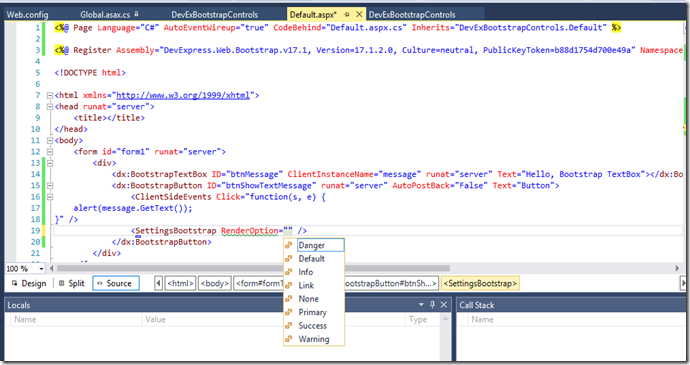
These bootstrap enabled controls has new properties section which specifies the bootstrap related properties. In case of button we use SettingsBootstrap.RenderOption to specifies the button style as shown in the above image.
<%@ Page Language="C#" AutoEventWireup="true" CodeBehind="Default.aspx.cs" Inherits="DevExBootstrapControls.Default" %>


<%@ Register Assembly="DevExpress.Web.Bootstrap.v17.1, Version=17.1.2.0, Culture=neutral, PublicKeyToken=b88d1754d700e49a" Namespace="DevExpress.Web.Bootstrap" TagPrefix="dx" %>


<%@ Register Assembly="DevExpress.Web.v17.1, Version=17.1.2.0, Culture=neutral, PublicKeyToken=b88d1754d700e49a" Namespace="DevExpress.Web" TagPrefix="dx" %>


<!DOCTYPE html>


<html xmlns="http://www.w3.org/1999/xhtml">

<head runat="server">

    <title></title>

    <!-- Latest compiled and minified CSS -->

    <link rel="stylesheet" href="https://maxcdn.bootstrapcdn.com/bootstrap/3.3.7/css/bootstrap.min.css" integrity="sha384-BVYiiSIFeK1dGmJRAkycuHAHRg32OmUcww7on3RYdg4Va+PmSTsz/K68vbdEjh4u" crossorigin="anonymous">


    <!-- Optional theme -->

    <link rel="stylesheet" href="https://maxcdn.bootstrapcdn.com/bootstrap/3.3.7/css/bootstrap-theme.min.css" integrity="sha384-rHyoN1iRsVXV4nD0JutlnGaslCJuC7uwjduW9SVrLvRYooPp2bWYgmgJQIXwl/Sp" crossorigin="anonymous">


    <!-- Latest compiled and minified JavaScript -->

    <script src="https://maxcdn.bootstrapcdn.com/bootstrap/3.3.7/js/bootstrap.min.js" integrity="sha384-Tc5IQib027qvyjSMfHjOMaLkfuWVxZxUPnCJA7l2mCWNIpG9mGCD8wGNIcPD7Txa" crossorigin="anonymous"></script>

</head>

<body>

    <form id="form1" runat="server">

        <div>

            <dx:BootstrapTextBox ID="btnMessage" ClientInstanceName="message" runat="server" Text="Hello, Bootstrap TextBox"></dx:BootstrapTextBox>

            <dx:BootstrapButton ID="btnShowTextMessage" runat="server" AutoPostBack="False" Text="Button">

                <ClientSideEvents Click="function(s, e) {

    alert(message.GetText());

}" />

                <SettingsBootstrap RenderOption="Success" />

            </dx:BootstrapButton>

            <br />

            <br />

            -- Grid --

            <br />

            <dx:BootstrapGridView ID="BootstrapGridView1" runat="server" AutoGenerateColumns="False" DataSourceID="SqlDataSource1" KeyFieldName="AddressID">

                <Columns>

                    <dx:BootstrapGridViewTextColumn FieldName="AddressID" ReadOnly="True" VisibleIndex="0">

                    </dx:BootstrapGridViewTextColumn>

                    <dx:BootstrapGridViewTextColumn FieldName="AddressLine1" VisibleIndex="1">

                    </dx:BootstrapGridViewTextColumn>

                    <dx:BootstrapGridViewTextColumn FieldName="AddressLine2" VisibleIndex="2">

                    </dx:BootstrapGridViewTextColumn>

                    <dx:BootstrapGridViewTextColumn FieldName="City" VisibleIndex="3">

                    </dx:BootstrapGridViewTextColumn>

                    <dx:BootstrapGridViewTextColumn FieldName="StateProvinceID" VisibleIndex="4">

                    </dx:BootstrapGridViewTextColumn>

                    <dx:BootstrapGridViewTextColumn FieldName="PostalCode" VisibleIndex="5">

                    </dx:BootstrapGridViewTextColumn>

                    <dx:BootstrapGridViewTextColumn FieldName="rowguid" VisibleIndex="6">

                    </dx:BootstrapGridViewTextColumn>

                    <dx:BootstrapGridViewDateColumn FieldName="ModifiedDate" VisibleIndex="7">

                    </dx:BootstrapGridViewDateColumn>

                </Columns>

                <CssClasses Table="grid-table-with-template" />

            </dx:BootstrapGridView>

            <asp:SqlDataSource ID="SqlDataSource1" runat="server" ConnectionString="<%$ ConnectionStrings:AdventureWorksConnectionString %>" ProviderName="<%$ ConnectionStrings:AdventureWorksConnectionString.ProviderName %>" SelectCommand="SELECT top 20 * FROM [Person_Address]"></asp:SqlDataSource>

        </div>

    </form>

</body>

</html>
and below is the output of these added controls on the page:
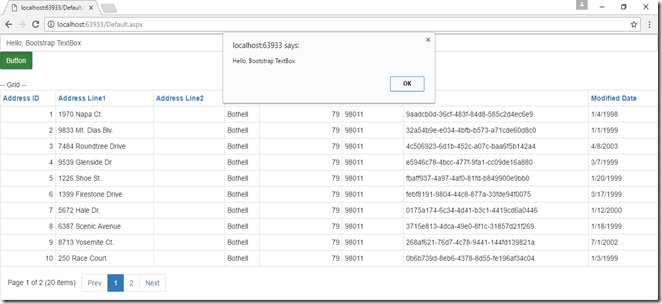
Conclusion: DevExpress Bootstrap controls idea is quite good and really decrease the development time rather using the flat table for rendering data and other operations using the editor controls. DevExpress native web form controls rich with the features so these Bootstrap enabled control really make intuitive user interface.
